This is a post for general support questions related to the MCP server.
I’m a bit confused, is the connection through oAuth and can we have an API key generated somewhere in the web-interface? That makes things easier for terminal-based agents right? My agent seems to think current API keys generated through the dashboard won’t work for the new Clerk oAuth/Bearer endpoint.
EDIT: Right, so I don’t use Claude or Codex. I use Hermes with Kimi K3. I figured out I can use Hermes’ web gateway to try to recreate your auth from the video, but this is what I get:
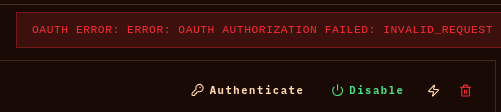
I am also experiencing the same too while setting it up over at Gemini and I provided some debugging hints from my Firefox DevTools Network tab and possibly having to do with OAuth scope mishaps.
Currently it’s OAuth only, no API key. Claude Code at the terminal handles that fine – claude mcp add --transport http jd https://johnnydecimal.com/mcp and then authenticate once you’ve launched the app.
I’ve never used Hermes, sorry. If it doesn’t natively/easily support OAuth connections let me know and I should be able to add it. I won’t try it now as we’ll be on the road later today and I don’t want to break what’s there.
I’ve just added profile to the list of available scopes at Clerk. Try again – this might fix it. Theoretically you should be able to instruct your agent not to request this scope – it doesn’t do anything. But there’s no harm in me passing it over. Hopefully this also fixes @clappingcactus.
That worked but guess Google Gemini also asks for [public|private]_metadata too  .
.
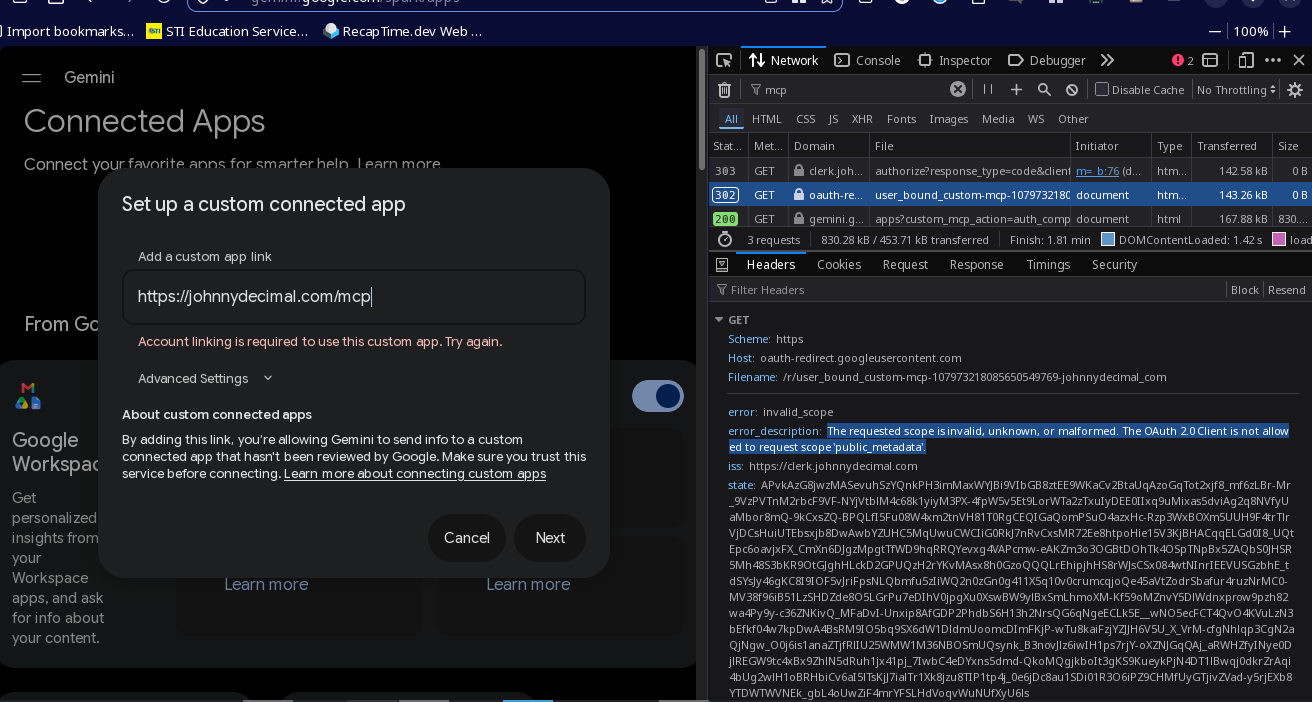
In case you need it, the requested scopes are the following for reference: openid profile email public_metadata private_metadata offline_access
Now that I read these settings properly, the default scopes that are ‘Applied when a dynamically registered OAuth client omits the scope parameter’[1] are the ones that I’ve chosen.
But presumably your client can simply request all scopes and get them, because I can see clients that have been granted the lot.
FYI your public_metadata contains the object that defines your user’s access and previous purchase amounts. And I don’t use private_metadata at all. (The public/private being more about where you can access that metadata from, API-wise.)
I’d be interested to know: is this information sent across the wire to your client? Or is what’s being granted access to this data the OAuth app hosted at Clerk? It makes no difference to us here, I’m just curious.
Clerk OAuth settings tooltip. ↩︎