is mostly a link to
Sounds like you’ve given a lot of thought the whole workflow and safety issues and such.
I hope the final version has you in a Picard costume the whole time because that would be awesome.
I had a Star Trek uniform once. We decided to have a party one of those times some crackpot group proclaimed that the world was going to end. We figured we might as well have a nice time before it did.
So the dress-up theme was just “the thing you’d always wanted to be”, because this is your last chance. 
You have to make money some how. JD systems don’t grow on trees.
I know, eh. I think I discovered this once when I installed a new distro and the Function Lock happened to be off.
That is — I believe what you’re referring to is the equivalent of turning off Function Lock on a PC keyboard[1]?
It’s so nice to have dedicated keys for things. It makes my laptop feel a little more like an airplane cockpit.
Once you get used to it, it’s no problem to hold the fn key when wanting to use the function printed on the key[2]. My ‘volume’ keys are used in non-function mode to create new tmux windows, and navigate between them. And f9 is mapped to :write in vim, and also exits isert mode if applicable. It’s so nice to have a single key for that.
It’s so meta that to turn function lock on and off, I have to use the Fn key:
Fn+Esc. ↩︎It’s less confusing than switching trackpad scroll directions. I still insist the screen is a viewport that I direct with my mouse, and not a piece of paper that I swipe up and down. But even this I can get used to, whenever I need to do some sysadmin on my wife’s computer. ↩︎
Ooh I should assign some F keys to tmux! I never remember how it works and have the ‘interrupt’ key set to backtick currently.
What’s your setup for inspiration? I’d like to be better at tmux.
Here’s my tmux.conf. I don’t pretend to understand tmux, and I don’t expect I ever will, although this tutorial gives me a bit of hope.
Those github.com/tmux-plugins plugins are pretty interesting. tmux-continuum and tmux-resurrect are pretty handy. I don’t know why I’m not using them now. Probably because I couldn’t understand them.
set -g mouse on
unbind C-b
set-option -g prefix C-a
bind-key -T prefix C-a send-prefix

bind | split-window -h
bind - split-window -v
unbind '"'
unbind %

bind -n M-PgUp previous-window
bind -n M-PgDn next-window
bind -n F2 new-window
bind -n F3 previous-window
bind -n F4 next-window


# switch panes using Alt-arrow without prefix
bind -n M-Left select-pane -L
bind -n M-Right select-pane -R
bind -n M-Up select-pane -U
bind -n M-Down select-pane -D

# List of plugins
set -g @plugin 'tmux-plugins/tpm'
set -g @plugin 'tmux-plugins/tmux-sensible'
set -g @plugin 'tmux-plugins/tmux-open'
#set -g @plugin 'tmux-plugins/tmux-resurrect'
#set -g @plugin 'tmux-plugins/tmux-continuum'
set -g @plugin 'tmux-plugins/tmux-yank'

#set -g @continuum-restore 'on'
#set -g @resurrect-strategy-nvim 'session'

# Initialize TMUX plugin manager (keep this line at the very bottom of tmux.conf)
run '~/.tmux/plugins/tpm/tpm'
I had an oh my god moment with tmux when I was visually screen-sharing my remote Mac. From this laptop I was tmux’d in – actually my shortcut to ssh to all of my remotes is now a tmux command, so I’m never only ssh’d, I’m always tmux’d. Hence wanting to learn it better.
Anyway, I’m in a terminal in my Mac and I think, might be better if I do this on the desktop of the remote, that I’m already screen-sharing to. So I open a terminal there, and fire up tmux. So now it’s running, same session, on both. One on the left, one on the right.
Imagine my surprise when I typed in one window and saw it literally mirrored, as I typed, on the other! That was the duh moment, the realisation that it truly makes no difference whose terminal window I’m using. It’s  the same.
This goes as far as the smaller of the two windows drawing a little terminal border … wait I’m just gonna replicate this because it’s too hard to explain.
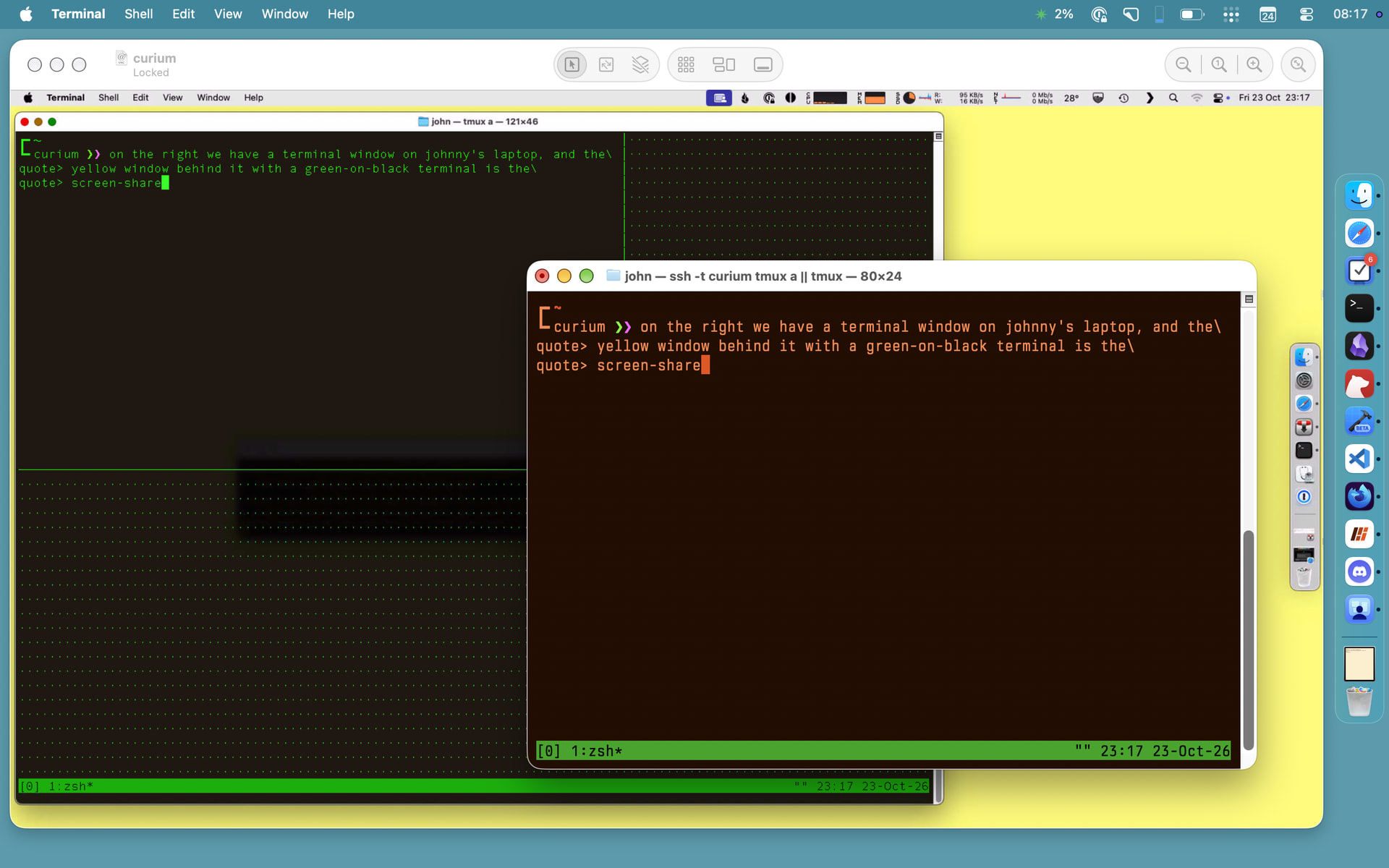
How cool is that!
I know, it’s magic!
You may enjoy what pico.sh has to show. I mean, you can do multicast realtime prodcasting, through ssh!!! Most of this is doable with plain ssh, but I find it so cool that people are actually offering infrastructure to make it all easier to use.
FWIW this makes me remember the days when we abused it for pair programming sessions via ssh. 