Software, Clients, & Vendors are the exact place I’ve decided to go with 3 digit ID for this reason. I really love having an succinct ID I can attach to each filename or email or document footer. It does break the 100 rule, but for these categories it’s been working great for me! Keeps things shallow, unique, & reference-able.
1 Like
That’s where I should move my 14.32 – up to 23 Equipment & machines. We envisaged that as a place for the sort of stuff you’ve got, but hey… this software is the equipment that keeps my business running.
Just something that immediatley popped up for me: I would refrain from using the tilde ~ character in dir/file names because that might lead to issues on the command line. AFAIK most shells expand it automatically to the user’s home directory path.
I’ve looked into this before and found the three POSIX-compliant portable special characters “.”, “_”, and “-”. Now Windows/Mac/Linux all have tons of overlapping special character allowances, but only those 3 characters are guaranteed to be permanently acceptable in file names across all operating systems and environments.
They do, but only at the start of a path – this one is always embedded between characters, so won’t be a problem.
Because indeed, if you limit yourself to only the strictly-never-cause-a-problem characters, there’s not much left!
Even . can cause problems. You may not end a Windows filename with a period. And of course if you start a *nix filename with one, it ends up hidden.
So, FYI, after spending a good hour writing my first response here we had a good discord discussion and I completely changed my notation, lol.
I got simpler. The only symbol I still use is @ for in-filename tags. So it’s for country codes, people, and rare very common things across the system like @OPS and @Checklist.
All index and normal notes are deeply nested in the Obsidian, thus, I use id only in the index note.
For quick search and linking I use these tricks:
12.23/ blahblahto search for some note inside known id. More often I use12./ blahblahbecause I usually know category but forgot id12/12. blahblahto search for index note. Keeping dot is important to surface index notes on top.
And here is an example tree
├── 10-19 Life admin
│   ├── 10 Management of area 10-19
│   │   ├── 10.00 JDex
│   │   │   └── 10.00 JDex.md
│   │   ├── 10.01 Inbox
│   │   │   └── 10.01 Inbox.md
│   ├── 11 Me & other living things
...
│   │   ├── 11.22 Health insurance & claims
│   │   │   ├── 11.22 Health insurance & claims.md
│   │   │   ├── 2018 XXX.md
│   │   │   ├── 2018 YYY.md
│   │   │   └── 2024 ZZZ.md
│   │   ├── 11.23 Primary care
│   │   │   ├── 11.23 Primary care.md
│   │   │   ├── Acetaminophen dosage for children.md
│   │   │   ├── @AA Primary care.md
│   │   │   └── @BB Primary care.md
│   │   ├── 11.24 Eyes, ears, & teeth
│   │   │   ├── 11.24 Eyes, ears, & teeth.md
│   │   │   └── @MK Eyes, ears, & teeth.md
To make it a bit easier to use and add an eye candy I installed Notebook Navigator.
The main reason for this approach: it’s just more obvious for someone who never used JD. No special notation and notes are close to the place they relates to.
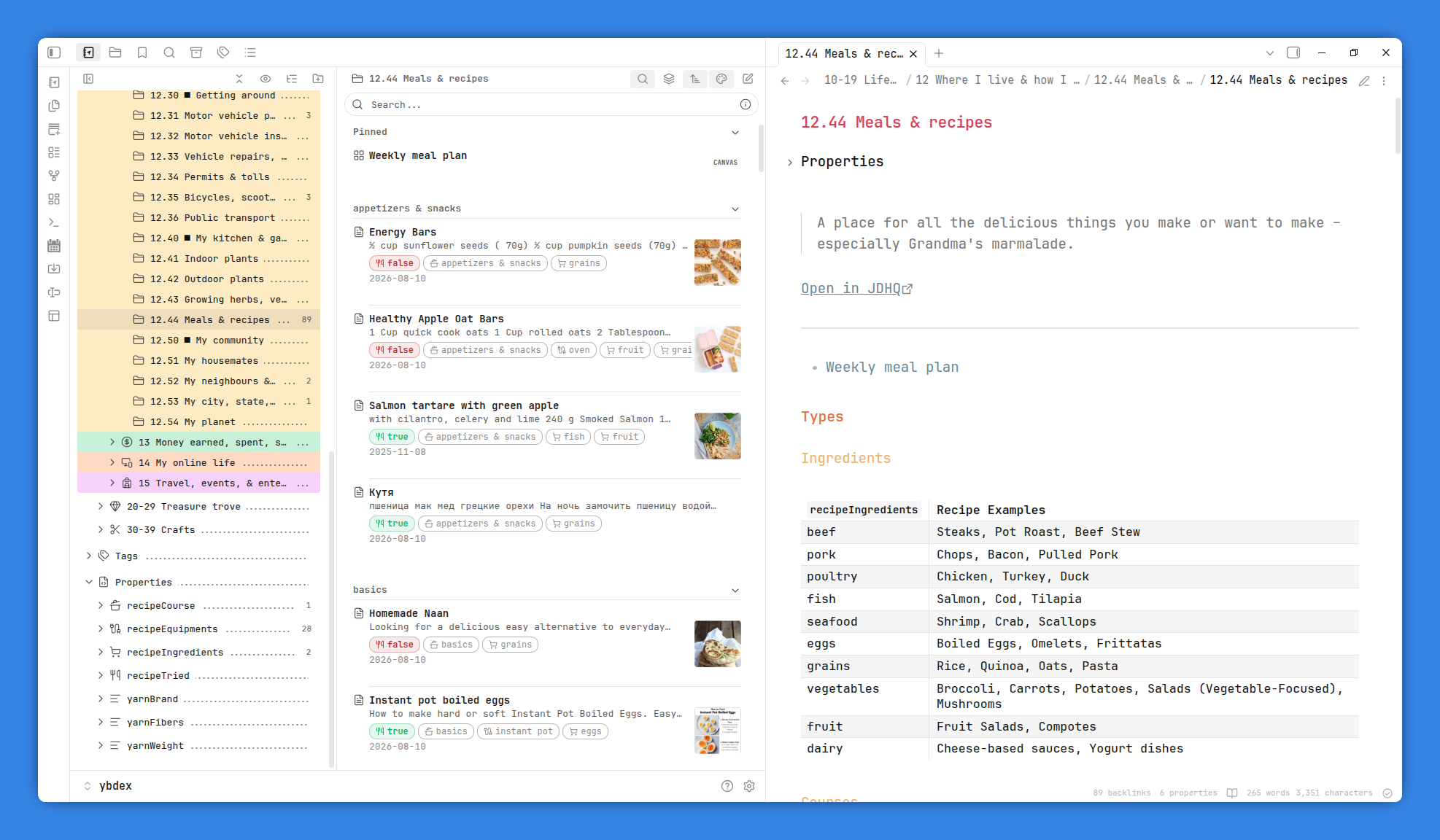
There is a simplicity here that I really like…
Got it. I am an academic so yes, can have lots of notes. Often these have a natural structure/hierarchy, e.g lecture notes for a class. So I am sticking with folders. I share Ontologist’s instinct for separating metadata from content. I use folder notes so it’s easy scan my structure to find the next available ID when creating a new “thing” vs the folder in which to add detail to an existing thing.
Love this search tip!